











How to Send Diagnostic Email to technical support team
Summary
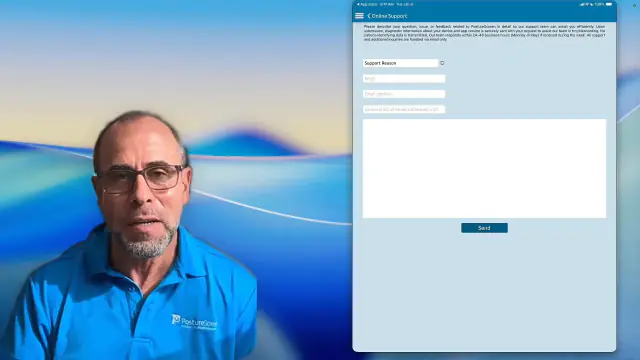
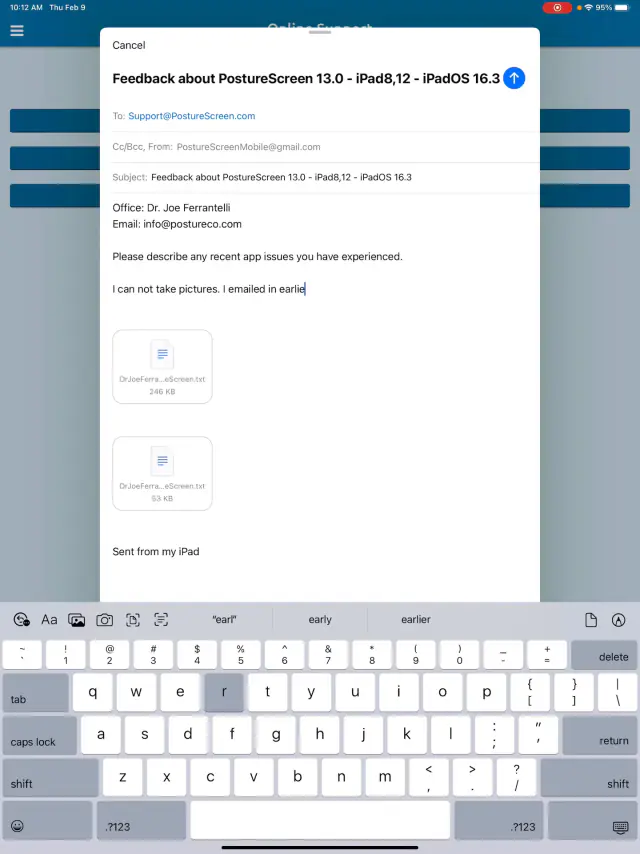
Use these steps to contact technical support directly from the PostureScreen iOS application and send diagnostic information with your request. This helps our team review your app settings and configuration so we can troubleshoot more quickly and accurately.
- Open the app and tap the Menu icon.
- Select How to Use.
- Enter a detailed description of your issue or question.
- Enter and confirm your email address carefully.
- Optional: CC yourself on the email.
- Tap Send to submit your diagnostic information.
- Most support responses are provided within 24 hours, often sooner.
 4:01
4:01
Legacy outdated versions of PostureScreen for iOS:#
 3:51
3:51
Related articles
-
 PostureScreen for iPad & iPhone
No Send PDF Report Option on iPhone – Greyed out
Starting in version 4.1 there is a reported bug that affects certain users using the iPhone. It is that a case when finished has no option…
1 min read
PostureScreen for iPad & iPhone
No Send PDF Report Option on iPhone – Greyed out
Starting in version 4.1 there is a reported bug that affects certain users using the iPhone. It is that a case when finished has no option…
1 min read
-
PostureScreen for iPad & iPhone
How to properly send emails from PostureScreen
In this tutorial we will review how to send emails with templates to your clients. This process does not change and is the same for any of…
2 videos · 12:091 min read
-
PostureScreen for iPad & iPhone
How to send WebExercises
In this tutorial we demonstrate how to send (email) your prescribed WebExercises content to your client using PostureScreen Mobile. In…
Video · 1:48
-
PostureScreen for Android
Send Android Device Specifications and App Version
In this tutorial we review how to easily share device information specifications with our support team in version 1.5.7.5 or older…
Video · 0:50
-
PostureScreen for iPad & iPhone
Changing Exam Date
Many people ask how to change an exam date, as they likely are importing pictures from their camera roll. When you create an exam, it will…
Video · 1:041 min read
-
PostureScreen for iPad & iPhone
Merging Clients, Bulk Delete Clients
In the following tutorials we review how to enter multi select mode and merge clients as well as bulk delete. Be sure to realize that…
2 videos · 3:551 min read
Have a question?
Talk to the people who build PostureScreen and PostureRay.
PostureScreen support is by email. Live PostureRay support runs Monday through Friday, 9 AM–5 PM Eastern (excluding U.S. holidays).