











3D Practice in PostureScreen®. Animations that explain the findings.
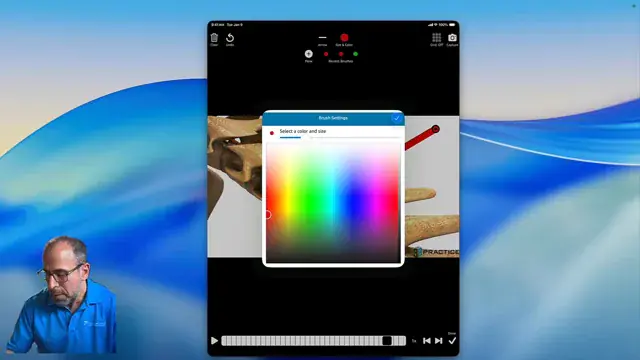
Educational spinal and posture animations from 3D Practice, inside PostureScreen®: screenshot them, annotate them and attach them to your PostureScreen® PDF reports.
Animation integrationWorks with your own 3D Practice account
A 3D Practice account is required for this integration, and it is available in PostureScreen® on iOS.

3D Practice at a glance
3D Practice is an animation company specializing in educational content for chiropractors and physical therapists. PostureScreen® has an exclusive partnership with them.
- What it does
- Puts 3D Practice animations of conditions, nerve charts and treatments into PostureScreen® for client education.
- In your reports
- Capture an annotated frame and attach it to a PDF report; clicking the image in the PDF plays the animation.
- What you need
- PostureScreen® on iPad or iPhone, plus your own 3D Practice account.
- Where to connect
- In PostureScreen®: Settings, then Web Exercises, then EHR Integration, then 3D Practice.
How it works
Connect once. Educate on the fly.
Link your 3D Practice account in PostureScreen®, then add animations to any client’s report in a few taps.
- 01
Connect
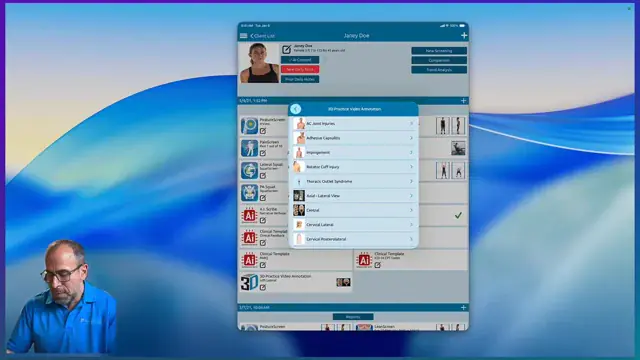
Open Settings, then Web Exercises, then EHR Integration, and choose 3D Practice. Sign in and PostureScreen® downloads what it needs.
- 02
Browse
Go to Movies to browse the 3D Practice animation catalog.
- 03
Add to a client
In the client’s account, add an education item, choose a 3D Practice video animation and pick the topic.
- 04
Annotate
Turn off the grid, scroll to the frame you want, draw arrows or circles on the key findings and tap Capture.
- 05
Report
Generate the PDF report and email it. When your client taps an image in the PDF, the animation plays.
Don’t have a 3D Practice account?
You can contact 3D Practice from the integration area in PostureScreen® and even start a free trial with them. The animations come with your 3D Practice account; they are not included with PostureScreen® or its in-app subscriptions.
What 3D Practice includes
More than animations in a report.
3D Practice is cloud-based report-of-findings software, made to help clients understand their care. It runs on any desktop, laptop or tablet in your office, with training and support for all office staff.
A library of 3D animations
Conditions, nerve charts and treatments, shown in 3D.
In your PostureScreen® reports
Easy on-the-go client education, with visual representations of conditions, nerve charts and treatments.
Interactive 3D Spine
Demonstrate each client’s own spinal curves.
Range of motion animations
Illustrate pre- and post-injury ranges so clients can see their progress.
Branded exercise and care plans
Reusable plans with your practice name and logo, texted or emailed to clients.
Narrated animations by text or email
Send 3D animations with voice narration straight to your clients.
Reception-room playlists
A custom playlist of narrated animations for your waiting room.
Website and social media
Post 3D animations and videos to your office website and social channels.
Schedule a 3D Practice demo (opens in a new tab) Watch the 3D Practice video on Vimeo (opens in a new tab)
Straight answers
Questions, answered.
Still wondering? Call 866-577-7297 or send us a message.
Is 3D Practice included with PostureScreen®?
No. A 3D Practice account is required for this integration. The animations come with your 3D Practice account, not with PostureScreen® or its in-app subscriptions.
Where do I connect my 3D Practice account?
In PostureScreen®, open Settings, then Web Exercises, then EHR Integration, and choose 3D Practice. Sign in with your 3D Practice username or email and password and tap Connect to 3D Practice.
Can I add animations to client reports?
Yes. Add a 3D Practice animation to a client’s education, annotate the frame you want, capture it and attach it to the PostureScreen® PDF report. When your client taps the image in the PDF, the animation plays.
Can I try 3D Practice first?
You can contact 3D Practice from the integration area in PostureScreen® and start a free trial with them, or schedule a demo on their website.
Which devices does it work on?
The 3D Practice integration is available in PostureScreen® on iOS, on iPad and iPhone.
Research
Scientifically validated.
Professionally trusted.
Verified counts, as of October 2026.5 See every study
- 157
- published studies have used or validated PostureScreen®
- 133
- of them are peer-reviewed journal articles
- 62
- publications on the PostureRay research page

“The PostureScreen mobile application has demonstrated strong rater reliability and preliminary evidence of construct validity.”
Rater reliability and construct validity of a mobile application for posture analysis. J Phys Ther Sci, 2018

Show clients what you found.
Assess in PostureScreen®, then explain it with 3D Practice animations in the report.