











Screen Black or photos fail to save when you attempt to take photo on iPhone/iPad
Summary
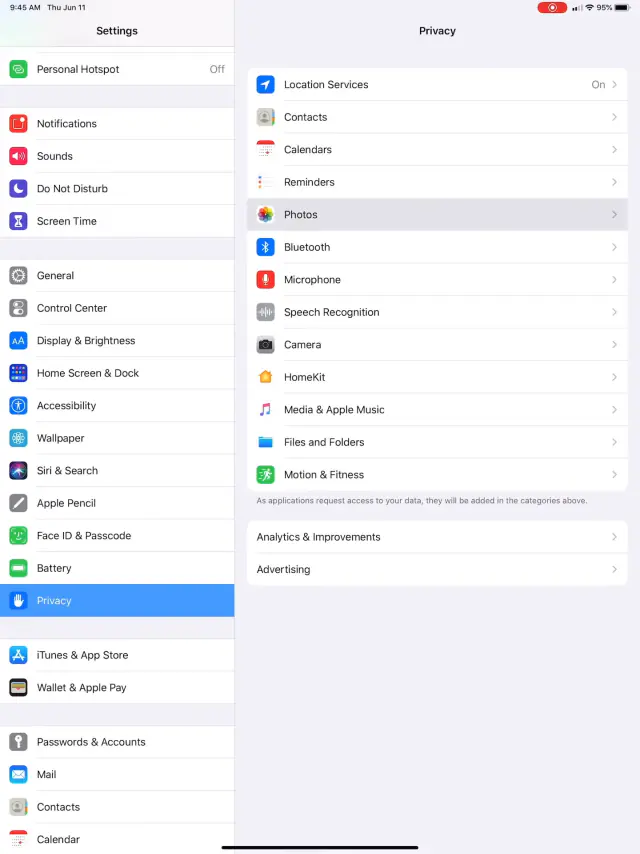
To resolve this, simply do the following:
If you attempt to take a photo and the screen is black, it means, barring the obvious that your device case is not covering the camera lens, that somewhere along the line when you installed the application you denied the operating system privileges to access the camera on the device. Meaning you blocked the app’s access by clicking NO to a prompt.
 1:11
1:11
Related articles
-
 PostureScreen for iPad & iPhone
How to check subscription status and / or change your subscriptions within PostureScreen
Many PostureScreen users reach out to support asking us to look up their account because the app isn’t working or they want to check their…
Video · 4:172 min read
PostureScreen for iPad & iPhone
How to check subscription status and / or change your subscriptions within PostureScreen
Many PostureScreen users reach out to support asking us to look up their account because the app isn’t working or they want to check their…
Video · 4:172 min read
- Knowledge Base Pain Diagram “PainScreen” feature in PostureScreen This module is a one time purchase upgrade -or- is also included with the Unlimited Assessment Subscription option. Here is a walk through… Video · 2:23
-
PostureScreen for iPad & iPhone
Advanced Thoraco-Lumbar Tangents and CVA/Skull Gaze Angle
In this tutorial we will review the new assessment update that allows you to turn on additional postural mensuration for both the 2-View…
Video · 15:451 min read
-
PostureScreen for iPad & iPhone
Alternate Backdrop Calibration
In this tutorial, we’ll demonstrate how to calibrate a linear distance using a known reference measurement within the patient’s photo…
Video · 8:262 min read
-
PostureScreen for iPad & iPhone
Anatomical Landmarks for Posture Analysis
In this tutorial we will review the basic overview of the anatomical landmarks for postural assessment using PostureScreen Mobile. Please…
Video · 3:441 min read
-
PostureScreen for iPad & iPhone
Apple and Android Devices, Do I have to purchase on both platforms?
QUESTION: Is it possible to purchase app on one platform say Android Google Play store, and then use on an iPad or vice versa? ANSWER…
1 min read
Have a question?
Talk to the people who build PostureScreen and PostureRay.
PostureScreen support is by email. Live PostureRay support runs Monday through Friday, 9 AM–5 PM Eastern (excluding U.S. holidays).