











Requesting Email change on your PostureCo Cloud Services account
Summary
Please note the following is to be used for only changing your Enterprise PostureScreen Account Ownership, Your SyncScreen Cloud Ownership, or your PostureRay Virtual Viewbox Ownership.
This does NOT change nor transfer your Apple or Google Purchases of PostureScreen to a new account. Our company has no control over transferring purchases made for PostureScreen to another Apple ID or Google ID for the appstore and you will have to repurchase the application from Google or Apple based on the version you use. The following is only for changing ownership of our cloud services legal login information.
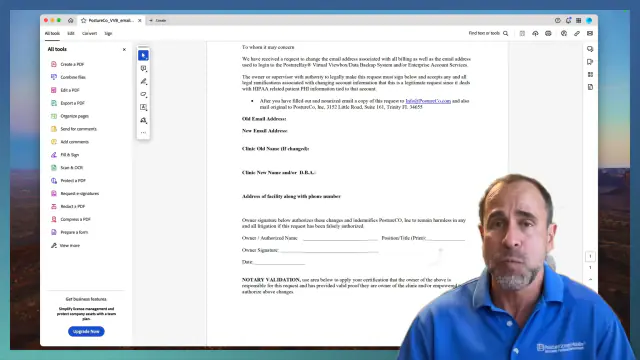 5:25
5:25
Affidavit PDF document:
PostureCo_VVB_email_name_changeDownload
Related Tutorial: How to reset your password for your PostureRay Viewbox and Backup Services: Virtual View Box Password Reset
Related Tutorial: How to reset your password for your PostureScreen Enterprise account: Enterprise PostureScreen Password Reset
Related articles
-
 PostureScreen for iPad & iPhone
Transferring App to another Account and problems with subscriptions
We are asked often about switching or transferring Apple accounts, or why a customer’s subscription is working on some devices but not on…
Video · 11:007 min read
PostureScreen for iPad & iPhone
Transferring App to another Account and problems with subscriptions
We are asked often about switching or transferring Apple accounts, or why a customer’s subscription is working on some devices but not on…
Video · 11:007 min read
-
PostureScreen for iPad & iPhone
Change default email account with PostureScreen Mobile
Change default email account with PostureScreen Mobile: a PostureCo knowledge base video tutorial.
Article
-
PostureScreen for iPad & iPhone
How to identify your Apple account?
Posture Screen can run on up to 10 devices. The subscription will only work across devices if they are all using the same original Apple…
Video · 4:152 min read
-
PostureScreen for iPad & iPhone
Cloud Backup Services – Reset password
Please note: SyncScreen has rebranded to Cloud Backup Services. In this tutorial we will review how to reset a Cloud Backup Services…
Video · 4:04
-
PostureScreen for iPad & iPhone
Enterprise PostureScreen Password Reset
In this tutorial we review the step of creating your own unique password after an administrator issues you login credentials for your…
Video · 4:021 min read
- PostureRay X-Ray EMR Virtual View Box Password Reset In this tutorial we will walk you through how to reset your password credentials Video · 3:31
Have a question?
Talk to the people who build PostureScreen and PostureRay.
PostureScreen support is by email. Live PostureRay support runs Monday through Friday, 9 AM–5 PM Eastern (excluding U.S. holidays).