










Spinal Screening Video for Events
Summary
Many people wish to run a looped video during a spinal screening event. This can be easily be done. However, you need to make sure you have a TV stand, and it is mounted in portrait “Vertical position”
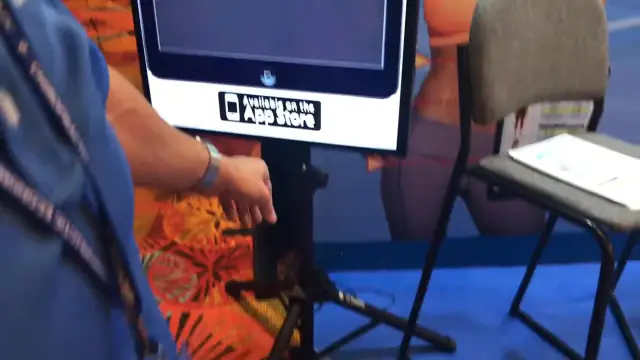 0:53
0:53
You will need a special tradeshow TV stand to accomplish this. You can buy these almost anywhere, but here is a link to a store http://www.displays2go.com/Search?q=tv+stands
The TV will then need to be hooked up to a laptop computer through the VGA, HDMI or DVI video port. You will then need to make sure to simply put on a ‘video looped’ play in the video client you choose to run the video.
Here is download link for the video: https://www.dropbox.com/scl/fo/n6hvujwy94a3jp8p6fl70/AATNTWVjE1OIIamojm4mtCM?rlkey=2jk753xxwyi6hsa885w3i4afi&st=5gyfj1qe&dl=0
NOTE: You may need to “Right Mouse Click” and “Save As” the link above to download and save the video to your hard drivePostureCo, Inc. can NOT support, trouble shoot, nor aid you in tradeshow setups beyond this article.
Related articles
-
 PostureScreen for iPad & iPhone
Annotating Movement Screen Videos
In this tutorial we will review how to annotate a Lateral SquatScreen Assessment. Many people already know we can video a generic movement…
Video · 3:401 min read
PostureScreen for iPad & iPhone
Annotating Movement Screen Videos
In this tutorial we will review how to annotate a Lateral SquatScreen Assessment. Many people already know we can video a generic movement…
Video · 3:401 min read
-
PostureScreen for iPad & iPhone
Generic Video Capture and Annotation
In this tutorial we will walk you through how to use the Generic Video Capture tool. The Generic Video Capture feature in PostureScreen…
Video · 11:423 min read
-
 RemoteScreen
Downloading and Processing a RemoteScreen Movement Screen (Video)
In this tutorial we review how to download a client’s video for their movement assessment.
Video · 2:44
RemoteScreen
Downloading and Processing a RemoteScreen Movement Screen (Video)
In this tutorial we review how to download a client’s video for their movement assessment.
Video · 2:44
-
PostureScreen for iPad & iPhone
Anatomical Landmarks for Posture Analysis
In this tutorial we will review the basic overview of the anatomical landmarks for postural assessment using PostureScreen Mobile. Please…
Video · 3:441 min read
-
PostureScreen for iPad & iPhone
HIPAA & GDPR Regulations
PostureScreen® keeps your patient and client records on your own device. Unless you use PostureCo Cloud Services or PostureScribe.AI® (or…
23 min read
-
PostureScreen for iPad & iPhone
How is posture analyzed in the app? Interpretation of reports
Question: How does PostureScreen Mobile analyze the general points?In General, the posture is analyzed from the region above to the region…
Video · 8:311 min read
Have a question?
Talk to the people who build PostureScreen and PostureRay.
PostureScreen support is by email. Live PostureRay support runs Monday through Friday, 9 AM–5 PM Eastern (excluding U.S. holidays).