











Demographic Export Module
On this page 4 sections
Summary
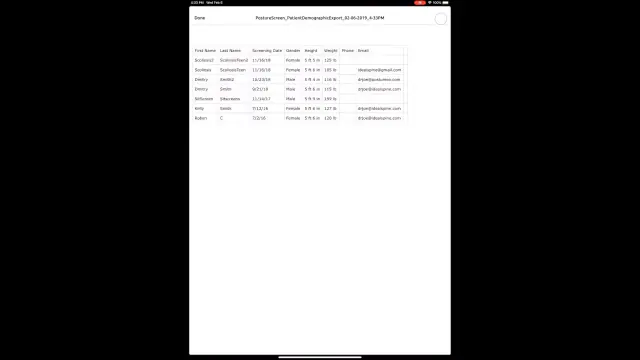
This feature allows you to quickly generate a Excel style demographic report for all screenings performed between a specified date range.
This report can be emailed to your main account which was entered in the email address section in PostureScreen Mobile as well as easily shared using the share sheet to any capable application on your device that can open it or any sharing service such as Dropbox, Google Drive, iCloud Drive, etc. This is included in the Unlimited Subscription which now unlocks all modules within PostureScreen. The report contains client information. Email and these sharing services are third-party services you choose, not part of PostureCo’s services, and no agreement with PostureCo covers them. If you are a HIPAA covered entity or business associate, email or share the report only through a business account covered by your own business associate agreement (BAA) with that company. If you work in health and fitness only, where you send it is up to you.
Patient information and Apple iCloud: iCloud Backup, iCloud Photos and iCloud Drive are Apple services, not part of PostureCo’s services, and no agreement with PostureCo covers them.
- If you are a HIPAA covered entity or business associate (most practices that bill health insurance electronically are), you should take these precautions, because Apple’s iCloud terms do not allow you to use iCloud for protected health information (PHI): do not save this report to iCloud Drive; turn off iCloud Backup for PostureScreen (Settings > [your name] > iCloud > iCloud Backup, or Storage > Backups, then choose this device and turn off PostureScreen); turn off “Save images to device Photos app” and “Save videos to device Photos app” in PostureScreen and keep patient photos out of the Photos app (with iCloud Photos on, they upload to iCloud; with it off, iCloud Backup can include them); and back up with PostureCo Cloud Services (Cloud Backup in the app), under a BAA we sign for U.S. healthcare practices on request, or an encrypted computer backup you control.
- If you work in health and fitness only and are not covered by HIPAA, these precautions are recommended but optional. Whether you take them is up to you, as long as you follow any other privacy law that applies to you.
See Section 7 of our Terms of Service.
 3:02
3:02
Support for importing the output of demographic export (.CSV file type) into Excel is as follows
If you simply open the file using excel, it is likely that the report will not open as intended in an excel table.#
This happens because the delimiters in Excel (Calc, OpenOffice, etc) are not set correctly. The delimiter must be set as semicolon .#
If you open the file by double-clicking, Excel will not know the delimiter to use and will default to comma (based on the region of US). Because this file is actually a data import file, you will need to import it into Excel… not just double click it.#
Here are some support instructions.#
- If you have Excel 2003 goto Data -> Import External Data -> Import Data on the menu bar and select the demographic file. This should launch the Text Import Wizard seen in the screenshots below.
- For Excel 2007: Select DATA -> FROM TEXT…
- For Excel prior to 2007: Select DATA -> GET EXTERNAL DATA -> IMPORT TEXT FILE…
Related articles
-
 PostureScreen for iPad & iPhone
DropBox & Google Drive Integration with PostureScreen: Sending Reports and Images
Google Drive Direct Integration has been included starting in version PostureScreen 15.5 PostureScreen now includes a fully revamped…
2 videos · 19:357 min read
PostureScreen for iPad & iPhone
DropBox & Google Drive Integration with PostureScreen: Sending Reports and Images
Google Drive Direct Integration has been included starting in version PostureScreen 15.5 PostureScreen now includes a fully revamped…
2 videos · 19:357 min read
-
PostureScreen for iPad & iPhone
How to Export SquatScreen jpg Images
In this tutorial we will review how to export jpg images from SquatScreen and use the iOS sharing feature.
Video · 3:20
-
PostureScreen for iPad & iPhone
How to remove the RemoteScreen text from your PostureScreen app
In recent versions of our applications, we now support integration with using RemoteScreen, think “Tele-medicine but for assessments”…
Video · 1:321 min read
-
PostureScreen for Android
Demographic Export Module – PostureScreen Android
In this tutorial we will review how to use the demographic export module on the Android version of PostureScreen.
Video · 2:02
-
PostureScreen for iPad & iPhone
Cloud Backup (formerly known as SyncScreen), RemoteScreen and Backup
What is our Cloud Solution: Cloud Backup Subscription Service (formerly known as SyncScreen Cloud)
8 videos · 37:426 min read
-
PostureScreen for iPad & iPhone
Comparison / Trend Analysis Module
Please take note that, to utilize this module, the patient’s chart must include more than one examination. It’s common for multiple exams…
Video · 9:061 min read
Have a question?
Talk to the people who build PostureScreen and PostureRay.
PostureScreen support is by email. Live PostureRay support runs Monday through Friday, 9 AM–5 PM Eastern (excluding U.S. holidays).