











Changing iOS Device Language
Summary
The application does default to whatever language iOS is running on the device. You can change the language for a specific application and leave the OS in Italian.
Please take the following steps.
Change the language of the application:
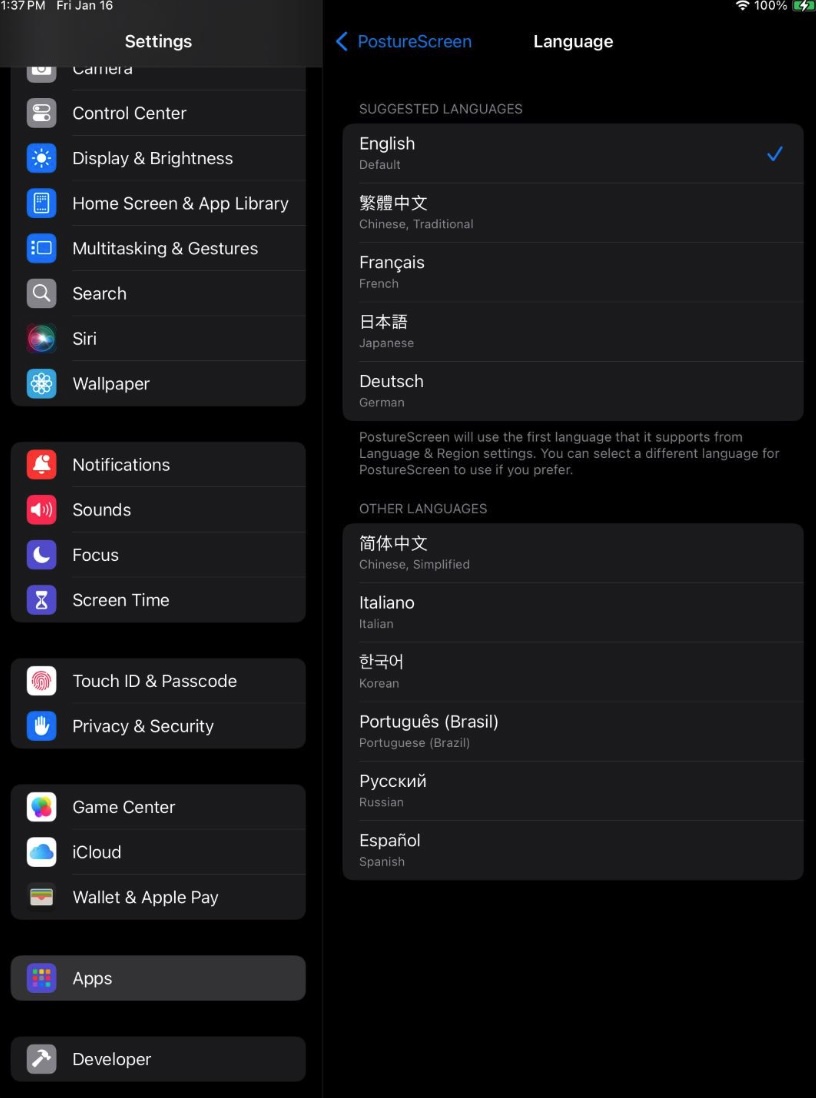
- Open the iOS Settings Application
- Scroll down and tap Apps
- Tap PostureScreen
- Tap Preferred Language
- Tap English or whichever language you prefer
#image_title
Change the language of the reports:
- Open PostureScreen
- Tap Settings
- Tap Editable Report Text and Office Letterhead
- Scroll to the bottom of the screen and tap the “Restore Default Text” button
Your application and reports will now be in English.
Related articles
-
 PostureScreen for iPad & iPhone
How to Change your Device Language in order to change app language
To change your language on your iOS please see the following order to proceed with changing and editing text you will need to have at…
1 min read
PostureScreen for iPad & iPhone
How to Change your Device Language in order to change app language
To change your language on your iOS please see the following order to proceed with changing and editing text you will need to have at…
1 min read
-
PostureScreen for iPad & iPhone
How to change your iOS Subscription
Changing your Apple iOS Subscription for PostureScreen is no different than any other application. This is all controlled completely…
Video · 2:321 min read
-
PostureScreen for iPad & iPhone
How to check subscription status and / or change your subscriptions within PostureScreen
Many PostureScreen users reach out to support asking us to look up their account because the app isn’t working or they want to check their…
Video · 4:172 min read
-
PostureScreen for iPad & iPhone
How to edit prior exams in PostureScreen
In this tutorial we will review how to edit prior assessments.
2 videos · 7:01
-
PostureScreen for iPad & iPhone
Change Language on your device and iOS application
In this tutorial we will instruct you how to change your default text from one language to another. When you download the iOS version of…
2 videos · 1:481 min read
-
PostureScreen for iPad & iPhone
Changing Exam Date
Many people ask how to change an exam date, as they likely are importing pictures from their camera roll. When you create an exam, it will…
Video · 1:041 min read
Have a question?
Talk to the people who build PostureScreen and PostureRay.
PostureScreen support is by email. Live PostureRay support runs Monday through Friday, 9 AM–5 PM Eastern (excluding U.S. holidays).